这是一则非常简练的使用 LLama 的方法。
Llama是Meta公司提供的一种语言模型,用于实验、创新和扩展想法。它可以用于自然语言处理任务,例如生成文本、回答问题等。
Meta公司提供了两个版本的模型,分别是7B和7B-chat,它们的用途略有不同。7B更加通用,chat专注聊天
使用Llama模型需要遵守Meta公司的商业许可协议、可接受使用政策和隐私政策。为了使用Llama模型,需要下载模型权重并设置正确的路径。在使用Llama模型时,需要注意潜在的风险,并采取适当的措施来减少这些风险。
Step 1 准备
你需要准备一台有 GPU 算力的计算机。Windows、Linux 皆可。怎么搞到GPU农场?
在上面安装 Nvidia 显卡驱动、bash、Python 3.10、Pip、Git、md5sum、wget。
我怎么知道我现在装好了Nvidia驱动、CUDA、和cudnn?
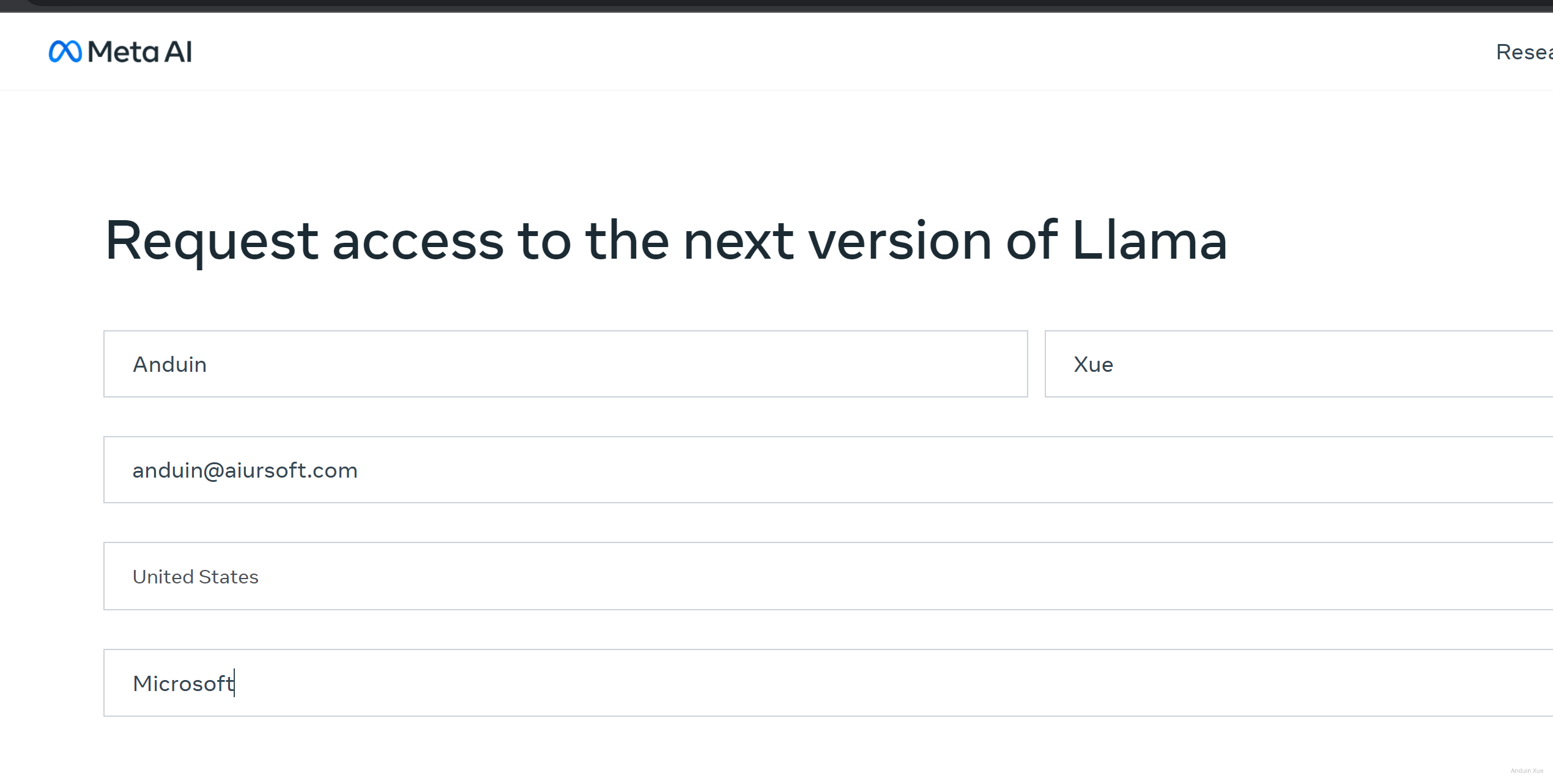
Step 2 填表
在这里填表 https://ai.meta.com/llama/
填表后提交。
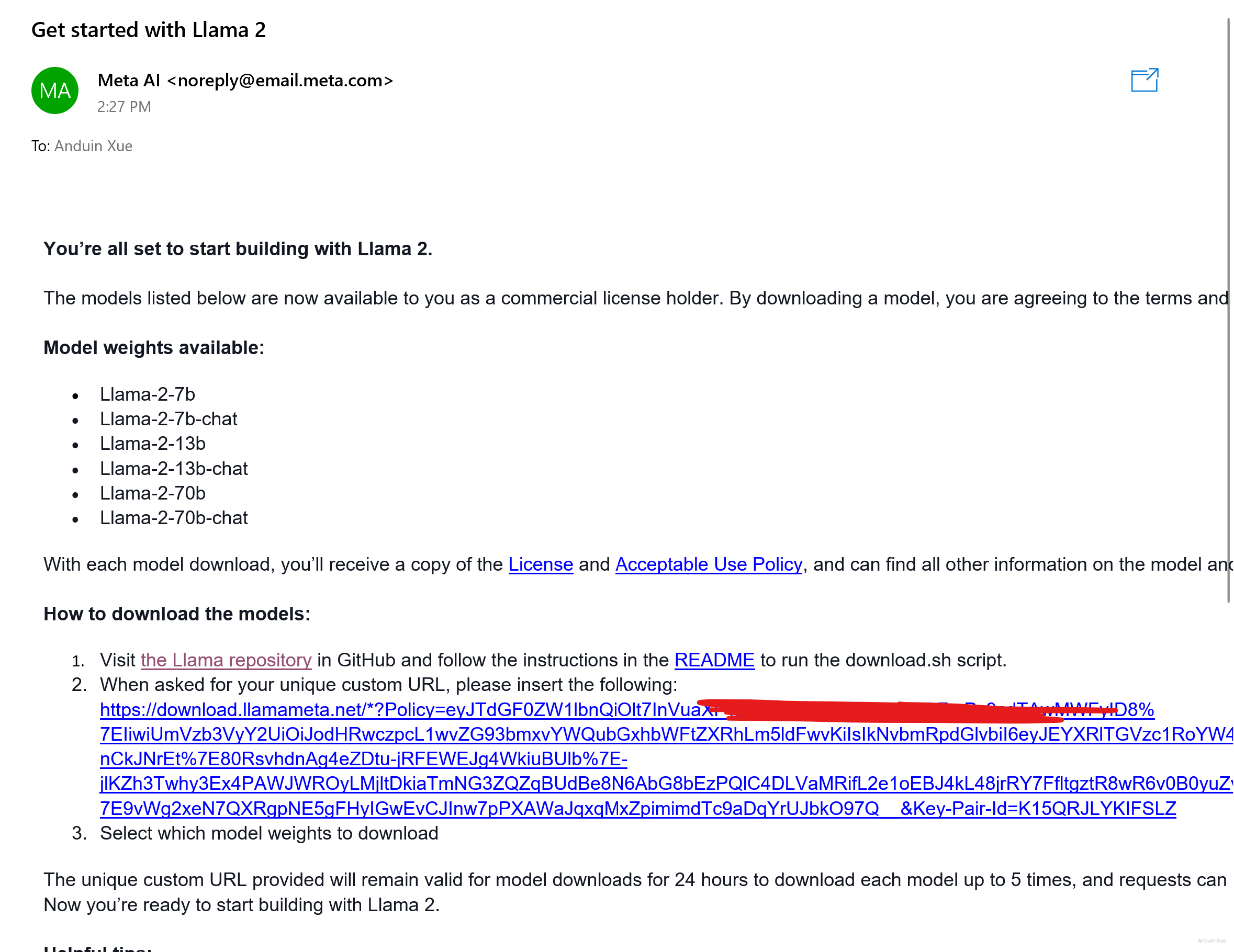
很快就会收到邮件。
Step 3 克隆
使用命令克隆仓库。
git clone https://github.com/facebookresearch/llama
Step 4 下载
运行clone完的仓库里的download.sh:
cd llama
chmod +x ./download.sh
./download.sh
它会询问你Email里的URL。从Email里找到并提供给它。
例如:
https://download.llamameta.net/*?Policy=eyJTdGFAAAAAAAA
Step 5 安装
下载完模型后,运行 pip install -e . 来准备环境。
pip install -e .
Step 6 运行
运行吧!
torchrun --nproc_per_node 1 example_text_completion.py \
    --ckpt_dir llama-2-7b/ \
    --tokenizer_path tokenizer.model \
    --max_seq_len 128 --max_batch_size 4

Step 7 魔改
是时候使用自己的问题了!
使用任意喜欢的编辑器编辑文件:complete.python
import fire

from llama import Llama

def main(
    ckpt_dir: str,
    tokenizer_path: str,
    temperature: float = 0.6,
    top_p: float = 0.9,
    max_seq_len: int = 128,
    max_gen_len: int = 64,
    max_batch_size: int = 4,
):
    generator = Llama.build(
        ckpt_dir=ckpt_dir,
        tokenizer_path=tokenizer_path,
        max_seq_len=max_seq_len,
        max_batch_size=max_batch_size,
    )

    prompts = [
        "The first person to reach the South Pole was the Norwegian explorer Roald Amderson and his team. However, the second person",
    ]
    results = generator.text_completion(
        prompts,
        max_gen_len=max_gen_len,
        temperature=temperature,
        top_p=top_p,
    )
    for prompt, result in zip(prompts, results):
        print(prompt)
        print(f"> {result['generation']}")


if __name__ == "__main__":
    fire.Fire(main)
之后跑跑试试吧!
torchrun --nproc_per_node 1 ./complete.python --ckpt_dir llama-2-7b/ --tokenizer_path tokenizer.model --max_seq_len 128 --max_batch_size 4

此时已经成功拥有了跑在自己计算机上的大语言模型了 。
这是一篇结构清晰、内容详实的LLaMA部署指南,作者以步骤分解的形式将复杂的技术流程转化为可操作的实践手册,体现了对新手友好和实用主义的核心理念。以下从内容价值、亮点分析与优化建议三个维度进行反馈:
价值与核心理念
文章精准把握了开源模型部署的三大痛点:环境配置门槛、授权流程复杂性与代码实现细节。通过将LLaMA的本地化部署拆解为7个可验证的步骤,作者成功构建了一个"可复制-可验证-可扩展"的实践框架。尤其在"魔改"章节中,通过展示代码修改示例,既满足了读者对模型自定义的需求,又巧妙规避了直接提供预训练模型可能引发的版权争议,这种平衡商业合规与开发者自由的思路值得肯定。
最大亮点:风险前置的合规设计
在Step 2中强调的授权表单填写环节,作者创造性地将Meta的授权机制转化为可操作的流程节点。这种设计不仅符合开源社区的协作精神,更通过"邮件授权-代码验证"的闭环机制,有效规避了模型权重非法传播的风险。相较于其他教程单纯强调"请遵守协议"的抽象表述,这种将合规性嵌入操作流程的实践方法具有显著的创新价值。
可改进方向
模型版本说明的拓展性
文章提到7B和7B-chat两个版本,但未提及LLaMA系列的完整版本图谱(如13B/34B等)。建议补充不同参数量版本的硬件需求对比表,例如7B需要至少12GB VRAM,而34B则需要多卡并行,这将帮助读者根据自身硬件条件选择适配版本。同时可对比chat版本与base版本的典型应用场景差异,如chat版本在对话理解任务上优化了上下文连贯性。
环境配置的细节深化
虽然提供了Ubuntu下CUDA安装的参考链接,但未涉及Windows系统的GPU驱动配置要点。建议补充NVIDIA驱动与CUDA Toolkit版本的兼容性矩阵(如LLaMA官方推荐的CUDA 11.7),并说明PyTorch的CUDA版本匹配逻辑。此外,可增加对
pip install -e .命令的解释,说明editable install模式对代码调试的实际价值。代码示例的可解释性提升
在
complete.python示例中,参数如temperature=0.6和top_p=0.9的设置缺乏技术解释。建议增加注释说明这两个参数对生成结果多样性的影响:temperature控制概率分布的平滑程度,而top_p实现nucleus sampling。同时可补充不同参数组合的对比实验建议,例如将temperature调低至0.3时生成结果会更保守。错误处理的预案机制
当前流程未涉及常见错误的解决方案。建议在Step 4中补充下载失败时的验证方法:通过
md5sum校验文件完整性,或提供镜像源配置建议。在Step 6中可预判"out of memory"错误的处理策略,如降低max_batch_size或启用梯度检查点。延展建议
在现有部署指南的基础上,可考虑扩展以下方向:
总体而言,这篇指南成功构建了一个从0到1的LLaMA实践路径,其"风险控制前置化"的编写理念具有行业参考价值。期待作者在后续版本中引入更多工程化实践,如Docker容器化部署方案或模型服务化改造案例,这将进一步提升教程的工业级应用潜力。
这篇文章为读者提供了清晰、分步骤的指南来体验 Meta 的 Llama 模型。对于想要尝试使用开源大语言模型的新手来说,这篇博客是一个很好的起点。以下是对这篇文章的一些评论和建议:
优点
git clone克隆仓库、下载模型权重以及运行推理脚本。建议
增加背景信息:
扩展魔改部分:
性能优化建议:
max_seq_len和max_gen_len等参数以适应不同任务需求。增加对比和总结:
依赖环境优化:
总结
这篇文章为读者提供了一个简洁明了的 Llama 使用指南,非常适合新手快速上手。如果能增加一些背景信息、扩展魔改部分以及提供更多的优化建议,将会更加全面和实用。期待看到更多关于 Llama 的深入探讨和实际应用案例!
在
pip install -e .这一步的时候可能会遇到:ERROR: THESE PACKAGES DO NOT MATCH THE HASHES FROM THE REQUIREMENTS FILE. If you have updated the package versions, please update the hashes.需要更新 pip: python.exe -m pip install --upgrade pip 并使用
pip install --upgrade -e .代替pip install -e .这篇博客为读者提供了一份详细且实用的 LLAMA 使用指南,我非常感谢作者的精心编写。文章的结构清晰,步骤详细,非常容易理解和操作,尤其是作者提供的链接和脚本代码,使得读者可以直接复制粘贴,避免了很多可能出现的错误。
不过,我也有一些小建议。首先,文章在介绍 LLAMA 时,可以再详细一些,比如它的主要特性、优点等,这样可以让读者更好地理解 LLAMA 的价值。其次,文章中提到需要遵守 Meta 公司的相关政策,但并没有提供相关链接,如果作者可以提供这些政策的链接,那么将会更加方便读者。
此外,对于初次接触 LLAMA 的读者,可能对 "torchrun" 命令并不熟悉,如果能够对这一命令进行简单的解释,那么将会对初学者更加友好。
总的来说,这篇文章是一篇非常实用的指南,我期待作者能够继续分享更多类似的内容。